Who Sklik is for#
Sklik is the PPC platform from Seznam.cz. It covers Seznam.cz and the Sklik partner network. A traditional choice for Czech and Slovak e-shops.
Two independent connections#
In Margly you can connect two separate parts of Sklik:
- Sklik (API Drak) — the classic ad account (Search, Display network, Retargeting). Connected via a Sklik API token generated in the Sklik account settings.
- Sklik Shopping (Fénix API) — Shopping campaigns on Seznam Zboží. Connected via a separate Fénix API key + shop ID. Fénix API is in beta — detailed product statistics will be fully available after beta ends.
Both connections are independent, you can have only one of them on or both.
Connecting the classic Sklik account (API Drak)#
Sklik doesn't use OAuth. Instead, in the Sklik administration you generate an API token for Drak API (the official name of the Sklik API interface) and paste it into Margly.
Log in to sklik.cz
On www.sklik.cz log in with email and password directly as the user who has access to your ad account. Caution: "impersonation" into another account (typical for agencies managing multiple clients) doesn't work — Margly for technical reasons can't work with agency tokens and returns an error. Therefore log in directly as the user under the given account.
Generate API token
After logging in, in Sklik click on your name in the top right → Settings → API access. You'll see two sections — for this connection you are interested in the upper API Drak access. Generate a new API token there and copy it immediately.
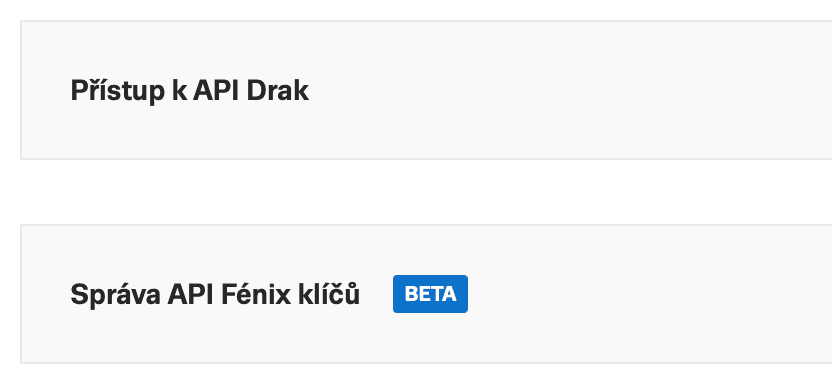
API access section in Sklik — for the classic connection pick API Drak access (upper). The lower section Fénix API key management serves for the separate connection of Sklik Shopping (Fénix API). Caution: Sklik shows the token only once. If you lose it, generate a new one in the same place.
Paste the token into Margly
In Margly open Integrations → Sklik and paste the token into the API token field. Click Connect Sklik. Margly immediately tests the token via the Sklik API and loads information about the ad account.
Margly pulls historical data
After successful verification Margly pulls the last 365 days (1 year) of historical daily statistics and campaign data. For regular accounts it takes on the order of minutes.
Connecting Sklik Shopping (Fénix API)#
If you are running Shopping campaigns on Seznam Zboží, you can also connect Fénix API for more detailed data about products and categories.
Generate Fénix API key in Sklik
In the Sklik settings find the Fénix API key management section and click Generate new API key. Copy the key.
Find shop ID
Fénix API needs a shop ID — a six-digit number assigned to your shop with an active Shopping campaign type. You can find it in two ways:
- In the Sklik administration in the shop overview (Sklik shows it directly for each shop)
- In the zbozi.cz administration
Fénix API can't enumerate the list of shops, so the ID must be entered manually.
Paste both into Margly
In Margly in Integrations → Sklik fill in the Seznam Shopping (Fénix API) section — paste the Fénix key and shop ID, click Connect. Margly verifies the combination of key × shop ID against the Sklik Fénix API.
What Margly actually loads from Sklik#
From the classic Sklik account (API Drak)#
Margly stores three kinds of data:
-
Summary daily statistics (for the entire ad account, daily granularity, the entire sync range):
- Number of impressions, number of clicks, spend, number of conversions, and their value
- CTR (click-through rate), average CPC (cost per click)
- Computed ROAS (return on ad spend)
-
Campaign snapshot for the last 30 days (one row per campaign):
- Campaign ID, name, status (active / paused)
- Daily budget
- 30-day summary: impressions, clicks, spend, number of conversions
- (This snapshot doesn't contain conversion value — for detail see the next point.)
-
Per-campaign daily statistics (each campaign × each day, the entire sync range):
- Impressions, clicks, spend, number of conversions, and their value
- Allow filtering campaign performance by day in the dashboard
Plus the current Sklik account credit status.
Margly doesn't load keyword detail or ad group level — the view is at the campaign level, not at the ad group level.
From Sklik Shopping (Fénix)#
Margly stores:
-
List of Shopping campaigns (snapshot, one row per campaign):
- Campaign ID, status, shop ID, bid management type (zbozi / feed / sklik), daily budget, portion of budget spent today
- (Fénix campaigns don't have their own name on the Sklik API — Margly therefore shows "Campaign #ID".)
-
Per-product statistics for the last 30 days (each product × each day):
- Product ID and name, category
- Breakdown by device type (mobile / desktop / tablet) and website type (main search / partner network)
- Impressions, clicks, spend, conversions, conversion value
- Number of items sold
- Average CPC, CTR, and PNO (cost share of revenue) per product
-
Per-category statistics for the last 30 days — same summary metrics as for products, just aggregated by category.
-
Credit status of Fénix wallet.
VAT and currency#
Sklik (Seznam.cz, a VAT payer) can also bill advertising to Slovak companies — but billing looks different depending on country and VAT status:
| Your country and status | How Sklik bills |
|---|---|
| CZ VAT payer | With Czech VAT 21 % (standard domestic billing, not reverse charge) |
| CZ non-VAT-payer | With Czech VAT 21 % |
| SK VAT payer | Without VAT in reverse-charge regime — you self-assess VAT according to the SK 23 % rate |
| SK non-VAT-payer | OSS/MOSS rules, typically with Czech VAT |
What Margly does with it:
- Stores spend without VAT as the Sklik Drak API returns it
- At the same time computes the variant with VAT according to the rate of your business country (CZ ×1.21, SK ×1.23). For CZ tenants this value corresponds to the real invoice. For SK VAT payers it serves as a basis for self-assessment — the Sklik invoice is for them without VAT, but for accounting purposes you compute VAT according to the Slovak rate.
- Displays in the dashboard either with VAT or without VAT, according to your choice in Billing → Show prices with VAT
Currency: Sklik returns spend exclusively in CZK. Margly therefore doesn't support Sklik for e-shops in a currency other than CZK — Sklik connect in Margly is rejected (see callout above). A Slovak company with a Czech e-shop in CZK can still connect Sklik, billing then proceeds in reverse-charge regime according to the rules above.
Common errors#
- "This token doesn't work" — the token was deleted in the Sklik settings or you copied it incorrectly (e.g., with a space). Generate a new one in Sklik.
- "You entered an agency token" — you pasted a token of an agency account that manages multiple advertiser accounts. Margly can't split such a token into a specific account — log in directly as the user of the advertiser account and generate a token there.
- "This Sklik API token is already used by another account in Margly" — the same token can't be assigned to two Margly accounts. First disconnect it from the old one (Integrations → Sklik → Disconnect).
- "Sklik returns no data" — the Sklik connection went through, but the account returned empty data. Most often because no campaigns are actually running on the account, or the token belongs to an account without active advertising. Check directly in Sklik that campaigns exist and are running.
- Fénix "The entered shop ID doesn't belong to this Fénix token" — the Fénix token and shop ID combination don't match. The token belongs to another user or the shop ID is from another shop — verify the ID in the shop overview in the Sklik administration or in the zbozi.cz administration.
What's next#
- Connecting Heureka — another Czech price comparison site, also via API key
- AI Advisor — compares Sklik profitability with Google Ads and Meta in the ad analysis